API and Data Flow
In the previous article, we learned how Flarum uses models to interact with data. Here, we'll learn how to get that data from the database to the JSON-API to the frontend, and all the way back again.
To use the built-in REST API as part of an integration, see Consuming the REST API.
API Request Lifecycle
Before we go into detail about how to extend Flarum's data API, it's worth thinking about the lifecycle of a typical API request:
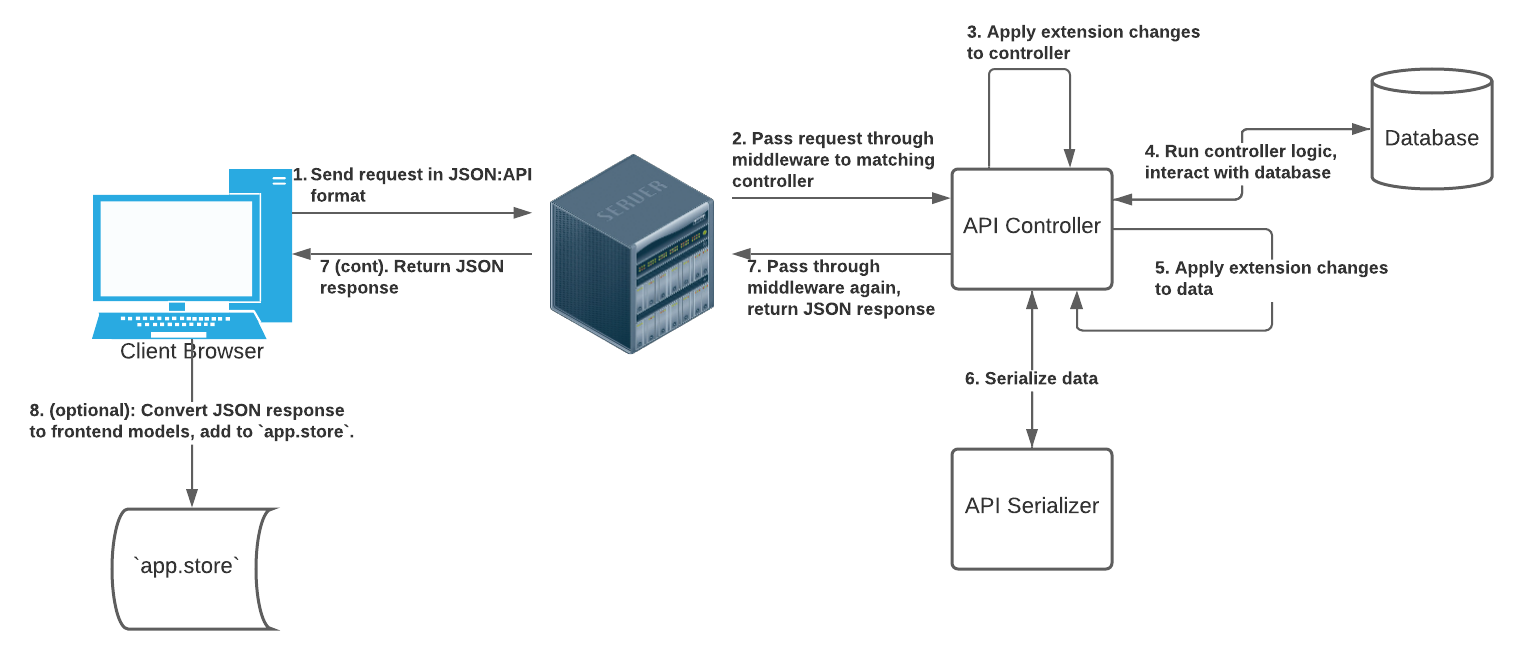
- An HTTP request is sent to Flarum's API. Typically, this will come from the Flarum frontend, but external programs can also interact with the API. Flarum's API mostly follows the JSON:API specification, so accordingly, requests should follow said specification.
- The request is run through middleware, and routed to the proper controller. You can learn more about controllers as a whole on our routes and content documentation. Assuming the request is to the API (which is the case for this section), the controller that handles the request will be a subclass of
Flarum\Api\AbstractSerializeController. - Any modifications done by extensions to the controller via the
ApiControllerextender are applied. This could entail changing sort, adding includes, changing the serializer, etc. - The
$this->data()method of the controller is called, yielding some raw data that should be returned to the client. Typically, this data will take the form of a Laravel Eloquent model collection or instance, which has been retrieved from the database. That being said, the data could be anything as long as the controller's serializer can process it. Each controller is responsible for implementing its owndatamethod. Note that forPATCH,POST, andDELETErequests,datawill perform the operation in question, and return the modified model instance. - That data is run through any pre-serialization callbacks that extensions register via the
ApiControllerextender. - The data is passed through a serializer, which converts it from the backend, database-friendly format to the JSON:API format expected by the frontend. It also attaches any related objects, which are run through their own serializers. As we'll explain below, extensions can add / override relationships and attributes at the serialization level.
- The serialized data is returned as a JSON response to the frontend.
- If the request originated via the Flarum frontend's
Store, the returned data (including any related objects) will be stored as frontend models in the frontend store.
API Endpoints
We learned how to use models to interact with data, but we still need to get that data from the backend to the frontend. We do this by writing API Controller routes, which implement logic for API endpoints.
As per the JSON:API convention, we'll want to add separate endpoints for each operation we support. Common operations are:
- Listing instances of a model (possibly including searching/filtering)
- Getting a single model instance
- Creating a model instance
- Updating a model instance
- Deleting a single model instance
We'll go over each type of controller shortly, but once they're written, you can add these five standard endpoints (or a subset of them) using the Routes extender:
    (new Extend\Routes('api'))
        ->get('/tags', 'tags.index', ListTagsController::class)
        ->get('/tags/{id}', 'tags.show', ShowTagController::class)
        ->post('/tags', 'tags.create', CreateTagController::class)
        ->patch('/tags/{id}', 'tags.update', UpdateTagController::class)
        ->delete('/tags/{id}', 'tags.delete', DeleteTagController::class)
Paths to API endpoints are not arbitrary! To support interactions with frontend models:
- The path should either be
/prefix/{id}for get/update/delete, or/prefixfor list/create. - the prefix (
tagsin the example above) must correspond to the JSON:API model type. You'll also use this model type in your serializer's$typeattribute, and when registering the frontend model (app.store.models.TYPE = MODEL_CLASS). - The methods must match the example above.
Also, remember that route names (tags.index, tags.show, etc) must be unique!
The Flarum\Api\Controller namespace contains a number of abstract controller classes that you can extend to easily implement your JSON-API resources.
You can use the CLI to automatically create your endpoint controllers:
$ flarum-cli make backend api-controller
Listing Resources
For the controller that lists your resource, extend the Flarum\Api\Controller\AbstractListController class. At a minimum, you need to specify the $serializer you want to use to serialize your models, and implement a data method to return a collection of models. The data method accepts the Request object and the tobscure/json-api Document.
use Flarum\Api\Controller\AbstractListController;
use Psr\Http\Message\ServerRequestInterface as Request;
use Tobscure\JsonApi\Document;

class ListTagsController extends AbstractListController
{
    public $serializer = TagSerializer::class;

    protected function data(Request $request, Document $document)
    {
        return Tag::all();
    }
}
Pagination
You can allow the number of resources being listed to be customized by specifying the limit and maxLimit properties on your controller:
    // The number of records included by default.
    public $limit = 20;

    // The maximum number of records that can be requested.
    public $maxLimit = 50;
You can then extract pagination information from the request using the extractLimit and extractOffset methods:
$limit = $this->extractLimit($request);
$offset = $this->extractOffset($request);

return Tag::skip($offset)->take($limit);
To add pagination links to the JSON:API document, use the Document::addPaginationLinks method.
Sorting
You can allow the sort order of resources being listed to be customized by specifying the sort and sortField properties on your controller:
    // The default sort field and order to use.
    public $sort = ['name' => 'asc'];

    // The fields that are available to be sorted by.
    public $sortFields = ['firstName', 'lastName'];
You can then extract sorting information from the request using the extractSort method. This will return an array of sort criteria which you can apply to your query:
use Illuminate\Support\Str;

// ...

$sort = $this->extractSort($request);
$query = Tag::query();

foreach ($sort as $field => $order) {
    $query->orderBy(Str::snake($field), $order);
}

return $query->get();
Searching and Filtering
Read our searching and filtering guide for more information!
Showing a Resource
For the controller that shows a single resource, extend the Flarum\Api\Controller\AbstractShowController class. Like for the list controller, you need to specify the $serializer you want to use to serialize your models, and implement a data method to return a single model. We'll learn about serializers in just a bit.
use Flarum\Api\Controller\AbstractShowController;
use Illuminate\Support\Arr;
use Psr\Http\Message\ServerRequestInterface as Request;
use Tobscure\JsonApi\Document;

class ShowTagController extends AbstractShowController
{
    public $serializer = TagSerializer::class;

    protected function data(Request $request, Document $document)
    {
        $id = Arr::get($request->getQueryParams(), 'id');

        return Tag::findOrFail($id);
    }
}
Creating a Resource
For the controller that creates a resource, extend the Flarum\Api\Controller\AbstractCreateController class. This is the same as the show controller, except the response status code will automatically be set to 201 Created. You can access the incoming JSON:API document body via $request->getParsedBody():
use Flarum\Api\Controller\AbstractCreateController;
use Illuminate\Support\Arr;
use Psr\Http\Message\ServerRequestInterface as Request;
use Tobscure\JsonApi\Document;

class CreateTagController extends AbstractCreateController
{
    public $serializer = TagSerializer::class;

    protected function data(Request $request, Document $document)
    {
        $attributes = Arr::get($request->getParsedBody(), 'data.attributes');

        return Tag::create([
            'name' => Arr::get($attributes, 'name')
        ]);
    }
}
Updating a Resource
For the controller that updates a resource, extend the Flarum\Api\Controller\AbstractShowController class. Like for the create controller, you can access the incoming JSON:API document body via $request->getParsedBody().
Deleting a Resource
For the controller that deletes a resource, extend the Flarum\Api\Controller\AbstractDeleteController class. You only need to implement a delete method which enacts the deletion. The controller will automatically return an empty 204 No Content response.
use Flarum\Api\Controller\AbstractDeleteController;
use Illuminate\Support\Arr;
use Psr\Http\Message\ServerRequestInterface as Request;

class DeleteTagController extends AbstractDeleteController
{
    protected function delete(Request $request)
    {
        $id = Arr::get($request->getQueryParams(), 'id');

        Tag::findOrFail($id)->delete();
    }
}
Including Relationships
To include relationships when listing, showing, or creating your resource, specify them in the $include and $optionalInclude properties on your controller:
    // The relationships that are included by default.
    public $include = ['user'];

    // Other relationships that are available to be included.
    public $optionalInclude = ['discussions'];
You can then get a list of included relationships using the extractInclude method. This can be used to eager-load the relationships on your models before they are serialized:
$relations = $this->extractInclude($request);

return Tag::all()->load($relations);
Extending API Controllers
It is possible to customize all of these options on existing API controllers too via the ApiController extender
use Flarum\Api\Event\WillGetData;
use Flarum\Api\Controller\ListDiscussionsController;
use Illuminate\Contracts\Events\Dispatcher;

return [
    (new Extend\ApiController(ListDiscussionsController::class))
        ->setSerializer(MyDiscussionSerializer::class)
        ->addInclude('user')
        ->addOptionalInclude('posts')
        ->setLimit(20)
        ->setMaxLimit(50)
        ->setSort(['name' => 'asc'])
        ->addSortField('firstName')
        ->prepareDataQuery(function ($controller) {
            // Add custom logic here to modify the controller
            // before data queries are executed.
        })
]
The ApiController extender can also be used to adjust data before serialization
use Flarum\Api\Event\WillSerializeData;
use Flarum\Api\Controller\ListDiscussionsController;
use Illuminate\Contracts\Events\Dispatcher;

return [
    (new Extend\ApiController(ListDiscussionsController::class))
        ->prepareDataForSerialization(function ($controller, $data, $request, $document) {
            $data->load('myCustomRelation');
        }),
]
Serializers
Before we can send our data to the frontend, we need to convert it to JSON:API format so that it can be consumed by the frontend. You should become familiar with the JSON:API specification. Flarum's JSON:API layer is powered by the tobscure/json-api library.
A serializer is just a class that converts some data (usually Eloquent models) into JSON:API.
Serializers serve as intermediaries between backend and frontend models: see the model documentation for more information.
To define a new resource type, create a new serializer class extending Flarum\Api\Serializer\AbstractSerializer. You must specify a resource $type and implement the getDefaultAttributes method which accepts the model instance as its only argument:
use Flarum\Api\Serializer\AbstractSerializer;
use Flarum\Api\Serializer\UserSerializer;

class DiscussionSerializer extends AbstractSerializer
{
    protected $type = 'discussions';

    protected function getDefaultAttributes($discussion)
    {
        return [
            'title' => $discussion->title,
        ];
    }
}
You can use the CLI to automatically create your serializer:
$ flarum-cli make backend api-serializer
Attributes and Relationships
You can also specify relationships for your resource. Simply create a new method with the same name as the relation on your model, and return a call to hasOne or hasMany depending on the nature of the relationship. You must pass in the model instance and the name of the serializer to use for the related resources.
    protected function user($discussion)
    {
        return $this->hasOne($discussion, UserSerializer::class);
    }
Extending Serializers
To add attributes and relationships to an existing resource type, use the ApiSerializer extender:
use Flarum\Api\Serializer\UserSerializer;

return [
    (new Extend\ApiSerializer(UserSerializer::class))
        // One attribute at a time
        ->attribute('firstName', function ($serializer, $user, $attributes) {
            return $user->first_name
        })
        // Multiple modifications at once, more complex logic
        ->mutate(function($serializer, $user, $attributes) {
            $attributes['someAttribute'] = $user->someAttribute;
            if ($serializer->getActor()->can('administrate')) {
                $attributes['someDate'] = $serializer->formatDate($user->some_date);
            }

            return $attributes;
        })
        // API relationships
        ->hasOne('phone', PhoneSerializer::class)
        ->hasMany('comments', CommentSerializer::class),
]
Non-Model Serializers and ForumSerializer
Serializers don't have to correspond to Eloquent models: you can define JSON:API resources for anything.
For instance, Flarum core uses the Flarum\Api\Serializer\ForumSerializer to send an initial payload to the frontend. This can include settings, whether the current user can perform certain actions, and other data. Many extensions add data to the payload by extending the attributes of ForumSerializer.